2.5 UPDATE Not Launching or Opening

+
2.5 update. I can't even enter the game. Every time I open the game using Steam and launch it from the RedLauncher, it doesn't even launch the game. What is the cause of this problem? I recently updated to the latest driver, which was required for the game to work, but then again I cannot play the game, nor does it open for me using the launcher or Vortex mod.

Does anyone know of a fix for this?

Do I need to delete or disable my mods?

Do I use the newly supported mod system by the devs? But I can't even get in the game

Will there be a fix soon? Hopefully...

Do I start crying? man I love this game, bruh...

Thank you for your time.

Screenshot 2026-09-25 185655.png
 
Upvote 1
Hi! I've been reading a few threads about this and a few people have mentioned that if you have the red4ext folder in your game directory, deleting it will solve the problem. I personally did the following:
1: I updated my graphics drivers (obv)
2: I updated most of the compatability mods that I have installed like CET.
3: After that didn't work, I deleted all of my mod archive files and all of the mods in the CET plugins folder.
4: After that didn't work either, I deleted the red4ext folder.

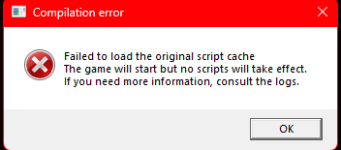
That last one was a critical step: Before it, the game wouldn't even launch. This time, the game DID launch, but I got a popup saying that none of the scripts would work. I am yet to find out how much this affects the game, but I suspect it'll render it unplayable. But the main menu is functioning well.

There's one weird thing that I think I should mention which could be related to all this:
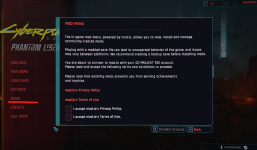
There's a new button in the main menu called mods, which, when clicked, prompts you to read and accept mod.io's terms of service to create a mod.io account linked to your cdpr account. The prompt also said that doing this would disable achievements. Not sure what this means for the modding scene.

Hope this helped.
 

Attachments

  • image_2026-10-22_214032245.png
    image_2026-10-22_214032245.png
    1.7 MB · Views: 1,934
  • image_2026-10-22_214135056.png
    image_2026-10-22_214135056.png
    7 KB · Views: 1,845
Last edited:
Upvote 0
Well I apparently can't play the game any more, as I need to update my AMD graphics driver but my old graphics card (which played the game fine until this update) is not compatible with the now required driver. And I won't be paying over-inflated prices for a new graphics card any time soon.
 
Upvote 0
I was having the same issue. my drivers etc. are all perfectly up to date but I have 1080Ti so I can't actually have the newest drivers. I had uninstalled Cyberpunk a month or so ago, so when I reinstalled it today I was surprised to see it wasn't working. I was assuming it was because of my drivers because of the warning I got when getting to the launcher. But TomcatCZ's suggestion of removing the red4ext folder from the game's directory folder seems to have fixed the issue. I did also go through and uninstall/delete all the mods I had that I thought I had already removed too, but I imagine it was removing the red4ext folder that sorted it.
 
Upvote 0
Hi! I've been reading a few threads about this and a few people have mentioned that if you have the red4ext folder in your game directory, deleting it will solve the problem. I personally did the following:
1: I updated my graphics drivers (obv)
2: I updated most of the compatability mods that I have installed like CET.
3: After that didn't work, I deleted all of my mod archive files and all of the mods in the CET plugins folder.
4: After that didn't work either, I deleted the red4ext folder.

That last one was a critical step: Before it, the game wouldn't even launch. This time, the game DID launch, but I got a popup saying that none of the scripts would work. I am yet to find out how much this affects the game, but I suspect it'll render it unplayable. But the main menu is functioning well.

There's one weird thing that I think I should mention which could be related to all this:
There's a new button in the main menu called mods, which, when clicked, prompts you to read and accept mod.io's terms of service to create a mod.io account linked to your cdpr account. The prompt also said that doing this would disable achievements. Not sure what this means for the modding scene.

Hope this helped.
Thanks for replying! Yeahhh, it did help. Too bad I can't use Vortex as a mod loader, because all my QOL changes and graphics mods are already set up there. So I need to transfer them manually :((((
 
Upvote 0
For anyone using mods.

Yes, your mods break the game. They rely on diverse hooks and lines that have changed.

Removing your mods might break your saves. The consequences on your save file can be permanent.

If you want to keep playing with the same save file, you need to wait for your mods to be updated and update them before resuming your playthrough to ensure the game works as intended.

If you can't muster the patience to wait, you should perform a clean install of the game and start a new game. Not performing a clean install after removing your mods can lead to problems as well.
 
Upvote 0
Running a pure AMD System, all graphics drivers are up to date. Game does not start.
Removing the Red4ext folder at least let me launch the game.
 
Upvote 0
For anyone using mods.

Yes, your mods break the game. They rely on diverse hooks and lines that have changed.

Removing your mods might break your saves. The consequences on your save file can be permanent.

If you want to keep playing with the same save file, you need to wait for your mods to be updated and update them before resuming your playthrough to ensure the game works as intended.

If you can't muster the patience to wait, you should perform a clean install of the game and start a new game. Not performing a clean install after removing your mods can lead to problems as well.
Thanks a bunchhh
 
Upvote 0
I spent hours trying to figure out why my game wasn't opening, I disabled all folders in the red4ext file (archiveXL, codeware and tweakXL) individualy and tested with no luck, red4ext itself is the issue, my conclusion is that with the latest cyberpunk update, red4ext has become outdated and we will need to wait for the mod author to update it, it hasn't had an update since March, the files within red4ext have all been updated as of 20th October, I read that you can change the name of red4ext to 1red4ext to bypass it, it didn't work for me but it might for others
 
Last edited:
Upvote 0
Well I apparently can't play the game any more, as I need to update my AMD graphics driver but my old graphics card (which played the game fine until this update) is not compatible with the now required driver. And I won't be paying over-inflated prices for a new graphics card any time soon.
I was getting told to update my Intel driver to a version that is literally not compatible with my driver. It was asking me to update to the new Arc driver... which is insane lol. Apparently the pop-up we were getting was in error and has been resolved. I'm no longer getting it, so you're probably fine with your setup as well.

If you don't have mods, check for the banner today to see if it's gone and then that wasn't your issue (and I don't know what it would be in that case.) If you DO have mods, that's your issue. The only thing that worked for me to get it to launch was to turn them off (specifically red4ext, which as of yesterday the developer of the mod had been working on to resolve and update.) Hang in there choom.
 
Upvote 0
I spent hours trying to figure out why my game wasn't opening, I disabled all folders in the red4ext file (archiveXL, codeware and tweakXL) individualy and tested with no luck, red4ext itself is the issue, my conclusion is that with the latest cyberpunk update, red4ext has become outdated and we will need to wait for the mod author to update it, it hasn't had an update since March, the files within red4ext have all been updated as of 20th October, I read that you can change the name of red4ext to 1red4ext to bypass it, it didn't work for me but it might for others
red4ext has since been updated on Nexus. Game still doesn't get past RedLauncher for me but maybe you'll have some luck now?
 
Upvote 0
For anyone using mods.

Yes, your mods break the game. They rely on diverse hooks and lines that have changed.

Removing your mods might break your saves. The consequences on your save file can be permanent.

If you want to keep playing with the same save file, you need to wait for your mods to be updated and update them before resuming your playthrough to ensure the game works as intended.

If you can't muster the patience to wait, you should perform a clean install of the game and start a new game. Not performing a clean install after removing your mods can lead to problems as well.
It happens to my save file. Will it work again if i just reinstall the exact mods i was using after the modders update them?
 
Upvote 0
It happens to my save file. Will it work again if i just reinstall the exact mods i was using after the modders update them?

If you update all of your mods that require an update, and you are certain you updated all your mods, then yes. Your save should work correctly afterwards.

Note that some mods may not require an update to function correctly. If a mod wasn't updated yet, look for a statement from the mod author on the front page or the comments of the mod. If there is nothing from the author themselves, look at user comments. User comments are a bit of a gamble as users typically don't have the necessary knowledge of the mod's inner working to fully know whether a mod is entirely safe to use but it can be helpful if an author has abandoned their mod.

If there is no such comment assume an update is required for the mod to work correctly.

Until you can confirm that all of your mods have been updated or don't require an update, don't use these specific saves.
 
Upvote 0
The solution for me was to reset the sharer's cache
GPU is AMD 6600
Went to Adrenalin -> Gaming -> Graphics, switched to Advanced mode, hit Reset Shader Cache, game loaded up.
Thanks, ChatGPT :)
 
Upvote 0
Well, I'm stuck too...

It was not working, i disabled mods. It did work again.

Then slowly but surely i found out which mods i can still use and which not. Worked for a while.
Next time i booted up the game, no launch again. Boggles mind.

Ok back to square one disabling all mods, game still don't launch...

WTF?! :(
Working now, after the mods updated and now i can play the game and even have the mods back on. I did trim a lot of them though to reduce chance of potential conflicts.

Hallelujah, finally i can play again!
 
Top Bottom