

Cyberpunk 2.5 update brick it everyone and PC users as well.

+
After the update 2.5 it brick everyone pc users, Some people working on pc and some most not working on pc version. I am using Asus Tuf A15 laptop i already did use the Nexus Mod clean Uninstall mod for Cyberpunk because it was not working with Nexus Mod . Once it clean remove Nexus Mod game is working fine and then got another big issues the game get Softlock cant click accept and go in to the game get stuck on the screen menu. Someone try to reinstall on Steam , had the same issues softlock too . I think these patch brick it everyone.
 

Attachments

  • image_2026-10-23_012927871.png
    image_2026-10-23_012927871.png
    2.2 MB · Views: 995
2.5 update. I can't even enter the game. Every time I open the game using steam and launch it from the RedLauncher, it doesn't even launch the game. What is the cause of this problem? I recently updated the latest driver which was required for the game to work but then again I cannot play the game nor does it open for me using the launcher or vortex mod. Does anyone know of a fix for this?
 
2.5 update. I can't even enter the game. Every time I open the game using steam and launch it from the RedLauncher, it doesn't even launch the game. What is the cause of this problem? I recently updated the latest driver which was required for the game to work but then again I cannot play the game nor does it open for me using the launcher or vortex mod. Does anyone know of a fix for this?
If you use Nexus Mod try to clean disabled it first , it will open but will get into another issues stuck at menu screen like me
 
Screenshot 2026-10-22 221254.png

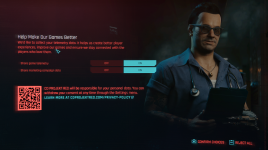
I can get to this screen and where it usually says "Press [space] to Continue," it just says "pressto continue." If I press space, it just crashes to desktop.
I've verified the game files about 4 times, moved all the mods out etc. Nothing seems to work.

I got to the screen someone posted above, about opting in or out of data sharing, but I wasn't able to confirm my choices and move beyond that screen, no matter what I chose.

Hopefully they'll be a fix for this coming. No sweat for now. Disappointing, but this stuff happens, so meh.
 
I deleted all my uninstalled mods , then I purged them via vortex , launched the launcher and turned mods off and I got the game to start when before it wouldn't even pop up . after you get in you get notifications and they added 'their own' mod section and even an area to download mods on the main menu so I think some where along the line they conflicted .

I also exited the game and turned mods on again and it wouldnt start .

update : you have to purge mods every time you turn them back on or ctd .


update: I cant find the FOV settings but I can run raytracing on psycho at 60fps which tells me the graphics options are not working properly
 
Last edited:
View attachment 11436483
I can get to this screen and where it usually says "Press [space] to Continue," it just says "pressto continue." If I press space, it just crashes to desktop.
I've verified the game files about 4 times, moved all the mods out etc. Nothing seems to work.

I got to the screen someone posted above, about opting in or out of data sharing, but I wasn't able to confirm my choices and move beyond that screen, no matter what I chose.

Hopefully they'll be a fix for this coming. No sweat for now. Disappointing, but this stuff happens, so meh.
try to do full clean install again my works normal
Post automatically merged:

I deleted all my uninstalled mods , then I purged them via vortex , launched the launcher and turned mods off and I got the game to start when before it wouldn't even pop up . after you get in you get notifications and they added 'their own' mod section and even an area to download mods on the main menu so I think some where along the line they conflicted .

I also exited the game and turned mods on again and it wouldnt start .

update : you have to purge mods every time you turn them back on or ctd .


update: I cant find the FOV settings but I can run raytracing on psycho at 60fps which tells me the graphics options are not working properly
try full reinstall might help
 
I updated all the core mods and the mods I have, but the game just silently crashes after clicking on play. it doesn't even open.

edit: also tried deleting the cache folder and repairing files, to no avail.
 
Same here, 2.5, GoG, launched yesterday, won't launch today. I know it's redscript, I disable that and it launches, but all of my mods are obviously broken. Redscript released a new version but it still doesn't launch...no error, no nothing, press Play, says it's Running, then back to nothing.
 
Same here, 2.5, GoG, launched yesterday, won't launch today. I know it's redscript, I disable that and it launches, but all of my mods are obviously broken. Redscript released a new version but it still doesn't launch...no error, no nothing, press Play, says it's Running, then back to nothing.
Yup, I just updated and same behavior.

EDIT: apparently the other core mods haven't been updated for patch 2.5 yet. :)
 
OK, for what it's worth, I figured out why I wasn't able to press spacebar to continue without it failing.

At some point I must have installed an input mod manually, which installed this file:

"E:\SteamLibrary\steamapps\common\Cyberpunk 2077\engine\config\platform\pc\input_loader.ini"

Once I deleted that file, i was able to continue on and I even got through the next data sharing screen. From there I loaded an old save and it ran well. This is probably somewhat of a neiche thing from my setup, but might help someone else.

Now to figure out how to get my mods back...
 
Looks like it´s always something atm...
First i had the driver issues but probably they were bc of mods.
Then i tried a clean reinstall but now the problems are just at another step.
Now i can start the game but it just starts in the background, i can hear the sound of the loading screen but the cursor is stuck in the left corner of the screen and it´s not possible to get the game on the screen even with clean settings.
The grafic drivers are all updated and other games work completely fine. No matter what i tried, can´t find a solution for that
 
Well, I have massive CPU bottlenecks in the city, while I didn't have it that bad in the previous version. 4070Ti Super + 5800X3D on RT Ultra + DLSS Quality NO Frame Gen and with version 2.31 i was at 80+ almost all the time with some slight drops in the upper 70s, with the version 2.5 I can barely hit 65-70 fps. GPU Usage is erratic, fluctuates like crazy with some heavy drops in the 50s and upper 40s. Almost unplayable. It's sad that I used to be able to play comfortably before the update and now my CPU struggles to keep up. It's playable without RT(in the 90s and 100s in terms of frames) but still GPU is not utilized fully and stands around 85%. RT was great in this game, now it's unusable. I tried everything and I'm on the latest Nvidia drivers, but it's still the same. Shame. At least I was able to rollback to the previous version and it's fine for now.
 
I have many versions of the game. Some modded some not. Driver issues for hardware I don't have. My Dell is up to date but it's asking for a driver I cannot install. Frustrating. I get the mod thing I expected that. So far the steamdeck works currentlly. Both PC versions (steam and GOG) are no go. I haven't tried the xbox version yet. (Yes I bought the GOG version to support CD Project RED. I bought the steam version for the steamdeck and my first copy was actually the Xbox series S and later X)
 
I cant launch the game with mods either but from what I found out its the "Red4Ext" scripting mod (that MANY other mods needs) that is still outdated. I hope a new release is coming within days.
 
Top Bottom