[Remastered 5.0 / PC] Save files grow with every save until ~97 MB, then become "damaged"

+
Hi everyone,

Platform: PC (Steam), The Witcher 3 Remastered 5.0, no mods. Also play on Switch 2 via Cross Progression. About 95 hours on PC.

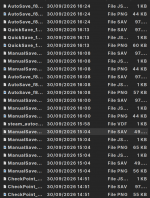
Since Sept 30 (around 14:00 CEST) I can't create working saves anymore. Every new save I make is bigger than the previous one, until it reaches ~97 MB (97,xxx KB). All saves at that size show:
"Save game data appears to be damaged and cannot be loaded."

The only saves that still load are two manual saves of 48.6 MB. I

What I already tried, with no change:
- Cross Progression off, Steam Cloud off, Steam offline
- PC restart, verify integrity of game files
- Windows Defender exception for the gamesaves folder
- Recreating the gamesaves folder from scratch
- Emptying the inventory back to normal weight (save size stays ~97 MB)
- OneDrive is not syncing the Documents folder
-Download the whole game again

Active accessibility options: ignore weight, infinite boat health, breathe underwater.

I already sent a ticket to CDPR support. Is anyone else seeing saves grow this big or hitting the same limit? Any workaround?

Thanks!
 

Attachments

  • Screenshot 2026-09-30 162711.png
    Screenshot 2026-09-30 162711.png
    216.1 KB · Views: 137
...no mods.
Clarifying:
1.) You have never used mods at any point in the past?

2.) You used mods in the past, but have since removed them?

A bloat issue like this can often result from mods being active then removed at a later point, resulting in reference data containing scripts that perpetuate endlessly, as their target data is no longer there.

If you did begin a new playthrough in a blank save slot with no mods ever being active, then contacting Support was the best option! Can you explain more about the playthrough?
  • How long have you been playing this run? (Number of hours?)
  • Any inventory issues?
  • What are the PC specs? And where is TW3 installed (HDD, SSD, M.2, etc.)?
Hello,

Thank you for your reply.

Mods: I have NEVER used mods, not in this playthrough and not in the past. The save metadata (.json) also shows "numMods": 0.

About the playthrough:
- It's the same playthrough I had before the Remastered update: about 83 hours on PC and 15 hours on Switch 2 (Cross Progression). I never had any save problems before.
- The saves started growing only after the Remastered update.
- No visible inventory issues in game. The only unusual things I use are the new Remastered options: unlimited inventory (ignore weight) and no item repair needed.

PC specs: AMD Ryzen 7 9800X3D, NVIDIA RTX 5080, 64 GB DDR5, Windows 11. The game is installed on a Samsung 990 M.2 NVMe SSD. The Documents folder (with the saves) is on drive D:.

Please note: I'm not technical and I don't really understand the details below. I asked an AI assistant (Claude) to analyze my save files, and I'm passing on what it reported:
- In a working save, ~35 MB of 44 MB (decompressed) are 45 FactsDB entries whose names are corrupted text (repeated UTF-8 re-encoding, bytes like "c3 83 c2 83..."). The real game data is only ~9 MB.
- These entries double in size on every load/save cycle.
- The broken save is 289 MB decompressed (276 chunks), but the header only has room for 255 chunk entries, so the chunk table overwrites the start of the data and the save can't be loaded.
- On a copy of my save, the assistant replaced those corrupted names with short plain names and recalculated the offsets: the copy loads and no longer grows
Post automatically merged:

UPDATE: cause found (and a workaround)

I'm not technical and I didn't really understand this myself, so I asked an AI assistant (Claude) to look inside my save files. Here's what it found, in simple words:

- The game keeps a kind of "diary" of everything that happens in your playthrough (books read, enemies killed, etc.). Every entry has a name.
- My save from BEFORE the Remastered: all names are normal.
- My saves AFTER the Remastered: there are 45 new entries with broken names. At the start they were just two random Chinese characters, like the game misread a few letters while converting the old save.
- Every time you load, the game rewrites those broken names and they double in size. After enough loads the save gets too big for the file format and becomes "damaged". That's why all my broken saves were exactly ~97 MB.

Workaround: Claude replaced those 45 broken names with normal letters, without changing anything else. The game loads the fixed save, and my new saves now stay around 2.4 MB without growing.

I've sent everything to CDPR support,
 
Last edited:
Interesting. I wonder if it's some form of regional conflict.

Or, it's just a bug. :p

The only recommendation I have for you is to back up any save files that predate the remastered release. (Meaning: the last access date is before the update.) It's possible that the corruption may be irreversible once it occurs, so prevention may be the only way to preserve those save files. (That's worst-case scenario, but better safe that sorry.)
 
Same issue here - corrupted save weights 40+mb, after loading it the game creates new checkpoint of 80mb, and next manual save takes 160mb of storage... no mods, tried all the acrobatics mentioned in Malahanna's post - re-linking my GoG account, re-enabling cross-progression, re-syncing with cloud saves, re-installing the game, emptying the inventory.
Loading older saves and progressing with the quests makes the issue occurring again, it seems like there is no civilized workaround.
 
Same here: save files jumped from 3->8->25->95 MB. The last save that is working is the 25MB one. I will loose a lot of progress if this won't be sorted out soon. Where can I contact support with the save files?

1791125881996.png
 
Pfff I have the same issue. I been playing all day. A save file early in the day works the other ones after that do not load. I removed all the saved files I could not load. And kept the last save I could load in with. The save I did after that. Same broken. This is very very frustrating.
 
Same bug here, and I can confirm the workaround from post #3 works – including on GOG.

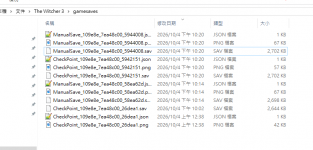
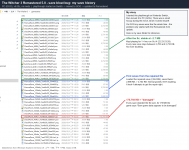
My setup: PC (GOG), version 5.00c, never used mods ("numMods": 0 in the .json). I started this playthrough on Nintendo Switch, then moved it to GOG(V 4.0). There was a small hiccup during the move, which I solved myself. On GOG my saves were fine the whole time – the problem only started with the Remastered (5.0) update. My saves then went 2.6 MB → ... → 89 MB (still loads) → 175 MB ("damaged"). Same pattern as everyone here: each load/save cycle doubles the file. Here is my save folder for reference (screenshot attached).

What I found (also with help from Claude, comparing my saves byte by byte):
- My very first save after the update (Sept 29) ALREADY had the broken entries – 41 of them in my case, each one starting as two CJK characters. So the damage seems to happen when the old save is converted to the Remastered, not later during play. Playing on from an older post-update save will hit the problem again (which matches what janek500 #5 ,norti #6, Stundar #7 saw).
- Each save re-encodes those names once more, so they double every time.

#The fix that finally worked for me (4th attempt):
Just renaming the broken entries is NOT enough. Several internal pointers have to be updated together, otherwise the game says "damaged", crashes, or hangs on the loading screen (I got all three before getting it right):
1. the broken names themselves (replaced with short plain names)
2. the variable index table at the end of the save
3. a small block-offset table (34 entries in my save)
4. a length field right before the facts section
After that, the save loaded fine. I've played for over an hour since, and my new saves stay at ~2.7 MB (2,644 → 2,698 → 2,702 KB) – no more doubling.

#Two tips for anyone affected:
- DON'T delete your "damaged" saves. Back up the whole gamesaves folder (including the .json/.png files). Once a save passes ~255 MB uncompressed, the chunk table overflows into the data; that's what makes it "damaged". Even those saves might be partly recoverable later, if a fix comes.
- Until CDPR patches this, keep your saves under control: check the file size after each save. If it keeps growing, stop and keep the last good one.

I really like this game, and it's not finished yet.
I'd be happy to provide the MD file.
I hope this is helpful to everyone. Feel free to Message me with any detailed questions.
-

2026/10/6 UPDATE:

I know how frustrating it is to deal with a corrupted save file you can't fix.
Thanks to helpful solutions shared by others, I was able to solve the issue and fully enjoy this game.
Here's a detailed step-by-step guide with screenshots.

#Disclaimer:
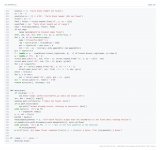
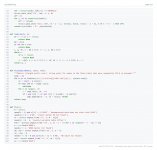
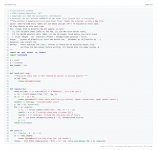
Notes: Images 1–4 are the guide; images 5–7 are the full script (w3_bloatfix.py, 152 lines, with line numbers).
If you retype or OCR the code, check \x byte values, 0/O and 1/l carefully, and indent with 4 spaces.
Before running, verify the SHA-256 shown in section 3. Requires Python 3 and lz4 (pip install lz4).
Always back up your entire gamesaves folder and work on copies. Do not post your saves publicly.
Unofficial and not affiliated with CD PROJEKT RED; use at your own risk.

-
This is an unofficial community workaround, not affiliated with or endorsed by CD PROJEKT RED.
It is provided "as is", without warranty of any kind. Use it at your own risk.
Always back up your entire gamesaves folder and run the script only on copies.
I am not responsible for any lost, corrupted, or unloadable saves, or any other damage.

It has worked on a few saves so far; yours may differ. If CDPR releases an official fix, use that instead.

-
w3_bloatfix.png

IMG_2357.png
guide_01.jpg

guide_02.jpg

guide_03.jpg

guide_04.jpg
 

Attachments

  • image.png
    image.png
    45.9 KB · Views: 112
  • 1151005_save-timeline-annotated.png
    1151005_save-timeline-annotated.png
    231.9 KB · Views: 86
  • w3_bloatfix_03.jpg
    w3_bloatfix_03.jpg
    394.2 KB · Views: 78
  • w3_bloatfix_02.jpg
    w3_bloatfix_02.jpg
    322.7 KB · Views: 73
  • w3_bloatfix_01.jpg
    w3_bloatfix_01.jpg
    393.2 KB · Views: 95
Last edited:
I am also having this problem now. I saved last night, went to bed only to discover the saves do not load anymore on the way to work. Polish language version on the PC with x-progression on Switch 2.
 
Hi guys.
After 500+ hours i stopped to play my favorite game. Anyway i would play again, waiting for the fix, but i don’t wanna lose everything. Do you know if this happens also on new game? Or just on converted ones from next gen?
 
no idea. all that I can say is that i started playing from beginning on pre-remaster version a week before the release date. My saves were converted to the new version once the remaster shipped.
 
Hi everyone, I've encountered the same problem, but on Xbox Series S. Of course, I can't check the file sizes, but the problem is exactly the same as yours. There is a save that works, but everything saved after that doesn't work, and when loading those saves, the game crashes to the Xbox home screen. All that's left is to wait for a solution.
There is also a discussion on Reddit where people have the same problem on other devices.
https://www.reddit.com/r/thewitcher3/comments/1wxh3cz
 
Same issue on PS5 since updating to 5.00b. I updated to the remastered version back on Sept 29th and picked back up with one of my 4.04 saves for roughly 50-60 hours now. Ever since updating to 5.00b every single one of my loads gives the "Save game data appears to be damaged and cannot be loaded." error message. This is includes my manual/auto/checkpoint saves, every single one of my post-4.04 save files. I've already tried booting my ps5 to safe mode to clear the cache/rebuild database as well as completely reinstalled the game. And I dont use any mods whatsoever. Also tried turning off cross progression and unlinking/relinking the red account on the games main menu but so far nothing seems to work.
 
I am so sick of the game. After fixing the issue with the corrupt save files. The game does not want to save anymore. Not manually nor automatic nor with F5. The ' Save Icon' appears but does nothing. And when i want to save the game it says " you cannot save the game right now" So. Again time lost and another save issue. Sick of it.
 
+1 to the issue, began playing before the remastered update, and after the 5.00c patch i can track a massive bloating of the save file size, i can no longer save my data as new files become corrupt.
So far I'll wait a few days for an official fix which i hope is coming asap.
If after a couple of weeks there's no official fix I'll try to apply the script shared here to see if i can restore my save files.
 
I am so sick of the game. After fixing the issue with the corrupt save files. The game does not want to save anymore. Not manually nor automatic nor with F5. The ' Save Icon' appears but does nothing. And when i want to save the game it says " you cannot save the game right now" So. Again time lost and another save issue. Sick of it.

bearantony's fix (Python script) worked for me (PC, Steam/GOG), I'm still playing the game after loading the fixed save and already saved 20 times without any bloating.
 
I am having a similar issue. I am playing across Xbox (5.00b), Switch 2 (5.00a) and Steam (5.00c). My latest progress is on Xbox. Cloud saves are enabled. Mods are disabled, though I did briefly download several and enable them on all platforms and that’s when the issues started. I removed them from all platforms and disabled mods but the issue has persisted. The issue: attempting to load a cloud save game results in a “save data unavailable” error.

Loading an older local game works but after playing for a while trying to save results in a “save failed” error and I lose all progress.

I don’t want to start over. I can’t download any cloud saves to inspect them for errors. What else can I do?
 
Top Bottom